How to Build a Cheap Cyberdeck at Home (Beginner Friendly)
Building a cheap cyberdeck at home is one of the most exciting DIY tech projects you can try today. A cyberdeck is basically a portable computer built for hacking-style tasks, coding, or general tech experiments. It looks futuristic but can be made using simple and affordable parts.
In this guide, you will learn how to build a cheap cyberdeck at home, even if you are a complete beginner. Everything is explained in easy English, step by step, so you can follow along without confusion.
Related: Here are 10 Most Innovative New Gadgets You Need to See in 2026
What is a Cyberdeck?
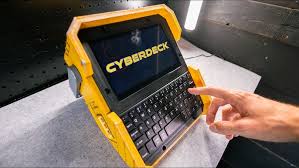
A cyberdeck is a custom-built portable computer. It usually includes a small screen, keyboard, battery, and a mini computer like a Raspberry Pi.
People build cyberdecks for:
- Programming and coding
- Learning Linux systems
- Cybersecurity practice (ethical hacking)
- Portable workstation setup
- Fun DIY tech projects
A cyberdeck is not a normal laptop. It is more creative, customizable, and often built from scratch.
Why Build a Cheap Cyberdeck?
You don’t need expensive tools to build a budget cyberdeck. In fact, most beginners build one using low-cost parts.
Benefits:
- Low cost (can be under $100–$200)
- Great learning experience
- Improves technical skills
- Fully customizable design
- Portable and unique setup
If you love DIY electronics or want a beginner cyberdeck build, this project is perfect.
Parts You Need for a Budget Cyberdeck
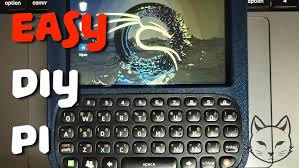
To build a cheap cyberdeck at home, you will need basic components. You can find most of these online or in local electronics shops.
1. Mini Computer
- Raspberry Pi 4 (recommended)
- Raspberry Pi 3 (cheaper option)
👉 Official site: https://www.raspberrypi.com/
2. Display Screen
- 7-inch HDMI display (most common)
- Old laptop screen (advanced option)
3. Keyboard
- Mini wireless keyboard
- Foldable Bluetooth keyboard
4. Battery Power
- Power bank (10,000mAh or more)
- Or Li-ion battery pack (advanced users)
5. Storage
- MicroSD card (32GB or more)
6. Case or Body
You can use:
- Plastic project box
- 3D printed case
- Old keyboard shell
- Wooden DIY frame
7. Extra Tools (Optional)
- Screws and nuts
- Wires and connectors
- Hot glue gun
People also search for: 12 Best Gadgets Under $50 That Make Life Easier
Step-by-Step: How to Build a Cyberdeck
Now let’s build your DIY cyberdeck step by step.
Step 1: Set Up Raspberry Pi
First, install an operating system on your Raspberry Pi.
- Download Raspberry Pi OS
- Flash it to microSD card
- Insert card into Raspberry Pi
👉 Guide: https://www.raspberrypi.com/software/
Turn it on and make sure it works properly.
Step 2: Connect the Screen
Now connect your display:
- Use HDMI cable
- Connect screen to Raspberry Pi
- Power the screen using USB or external battery
Once connected, you should see the Raspberry Pi desktop.
Step 3: Add Keyboard and Mouse
Plug in your:
- USB keyboard or Bluetooth keyboard
- Mouse (optional if touchscreen)
This makes your cyberdeck setup usable like a mini laptop.
Step 4: Power Setup
A real portable cyberdeck needs a strong power source.
Options:
- Power bank (easy method)
- Battery pack with step-up converter
Make sure your setup can run for at least 2–4 hours.
Step 5: Build the Cyberdeck Case
This is where creativity comes in.
You can design your cyberdeck at home using:
- Old laptop shell (best look)
- Wooden box (easy DIY)
- Plastic enclosure
- 3D printed frame
Arrange everything inside:
- Screen on top
- Raspberry Pi behind screen
- Battery at the bottom
Use glue, screws, or brackets to fix parts.
DIY Cyberdeck Tools & Materials List
| Sr No. | Item | Purpose | Budget Level |
|---|---|---|---|
| 1 | Raspberry Pi 4 | Main mini computer for cyberdeck | Low |
| 2 | HDMI Display (7 inch) | Screen output display | Low-Medium |
| 3 | MicroSD Card (32GB+) | Storage for OS and files | Low |
| 4 | Power Bank | Portable power supply | Low |
| 5 | Mini Keyboard | Input device | Low |
| 6 | DIY Case / Box | Body structure for cyberdeck | Low |
Step 6: Cable Management
Keep wires neat:
- Use zip ties
- Tape loose cables
- Route cables behind panels
A clean setup makes your cyberdeck look professional.
Step 7: Install Useful Software
Now upgrade your cyberdeck with useful tools:
- Terminal tools (Linux commands)
- Code editors like VS Code
- Network tools (for learning cybersecurity)
- Web browser
👉 Linux tools reference: https://www.linux.org/
Beginner Cyberdeck Build Tips
If you are new, follow these tips:
- Start small (don’t overcomplicate)
- Use Raspberry Pi instead of laptop motherboard
- Keep design simple
- Focus on function first, looks later
- Watch DIY builds online for ideas
Related: Here are Top Trending Wearable Tech Gadgets of 2026
Cyberdeck Design Ideas
Here are some cheap cyberdeck ideas:
1. Laptop Style Cyberdeck
Looks like a mini laptop with screen + keyboard.
2. Book Cyberdeck
Hidden inside a book-style case.
3. Military Style Cyberdeck
Rugged design with protective case.
4. Portable Handheld Cyberdeck
Small screen + mini keyboard for mobility.
Common Mistakes to Avoid
- Using weak power supply
- Poor cable connections
- Overheating Raspberry Pi
- Buying unnecessary expensive parts
- Overcomplicated design as a beginner
How Much Does It Cost?
A cheap cyberdeck at home can cost:
- Raspberry Pi: $35–$75
- Screen: $20–$40
- Keyboard: $10–$25
- Battery: $15–$30
- Case materials: $10–$20
Total: $80 to $150 (budget build)
Is Cyberdeck Good for Beginners?
Yes, a beginner cyberdeck build is perfect if you want to learn:
- Linux
- Hardware setup
- Programming basics
- DIY electronics skills
It is also a fun project for students and tech lovers.
Common Issues in Cyberdeck Builds
1. Device not turning on
Check battery connection or power cable.
2. Screen not displaying
Make sure HDMI is properly connected.
3. Slow performance
Use lightweight OS like Raspberry Pi OS Lite.
4. Overheating issues
Add small cooling fan or ventilation holes.
Pro Tips for Better Cyberdeck Build
- Use lightweight materials to reduce weight
- Always test parts before final assembly
- Keep wiring clean and organized
- Start with basic build, then upgrade later
- Use open-source software for flexibility
Final Thoughts
Building a cheap cyberdeck at home is not just a tech project—it is a creative journey. You learn how computers work, how hardware connects, and how software runs on real devices.
Even with a small budget, you can build something powerful, portable, and futuristic. Start simple, experiment, and improve your design over time.
Your first DIY cyberdeck doesn’t need to be perfect—it just needs to work.
Quick Summary
- A cyberdeck is a DIY portable computer
- You can build it using Raspberry Pi and low-cost parts
- Total cost is around $80–$150
- It is great for learning Linux and coding
- Beginners can build it in 1–3 days
Try This Next
If you liked this guide on how to build a cheap cyberdeck at home, you may also enjoy:
- Raspberry Pi beginner projects
- DIY portable computer ideas
- Linux basics for beginners
- Cybersecurity practice setups
Keep experimenting and upgrading your cyberdeck as you learn new skills.
FAQ – How to Build a Cheap Cyberdeck at Home (Beginner Friendly)
1. What is a cyberdeck in simple words?
A cyberdeck is a small, portable computer built using parts like a Raspberry Pi, screen, and keyboard. It is a DIY project that looks like a futuristic laptop and is used for coding, learning Linux, and tech experiments.
2. How much does it cost to build a cheap cyberdeck?
A basic budget cyberdeck usually costs between $80 to $150, depending on the parts you choose. Using a Raspberry Pi and a simple screen keeps the cost low.
3. Is a cyberdeck good for beginners?
Yes, a beginner cyberdeck build is perfect for learning. It helps you understand hardware, Linux, and basic electronics without needing advanced skills.
4. What is the best device for a cyberdeck?
The most popular choice is a Raspberry Pi 4 because it is cheap, powerful, and easy to use. It works well for most DIY cyberdeck projects.
5. Can I build a cyberdeck without coding knowledge?
Yes. You can start without coding experience. However, learning basic Linux commands and simple programming will help you get more out of your cyberdeck.
6. Do I need special tools to build a cyberdeck?
No special tools are required. Most people use simple items like screwdrivers, hot glue, zip ties, and basic DIY materials.
7. Can I use old laptop parts for a cyberdeck?
Yes, many people reuse old laptop screens, keyboards, or cases to build a DIY cyberdeck. This helps reduce cost and makes the project more sustainable.
8. What operating system does a cyberdeck use?
Most cyberdecks use Raspberry Pi OS (Linux-based), but you can also install other Linux distributions depending on your needs.
9. Is a cyberdeck portable?
Yes, a cyberdeck is designed to be portable. With a proper battery setup like a power bank, you can carry it and use it anywhere.
10. Where can I find cyberdeck project ideas?
You can find ideas on websites like:
- https://www.instructables.com/
- Raspberry Pi community forums
These platforms have many DIY cyberdeck tutorials and creative builds.
Related Article: 10 Trending Selfie Gadgets you Need for Stunning Shots